
How to create a mailbox in ISPmanager?
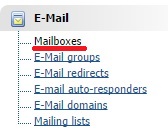
First you need to find the "Mailboxes" subsection in "E-Mail" section.
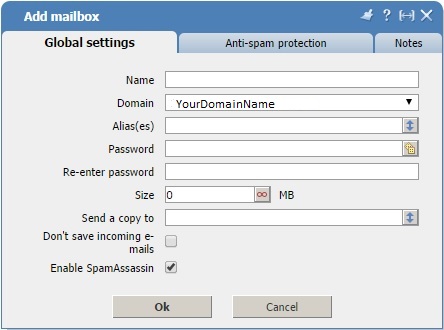
In the upper right corner, click "New".

Fill all the required fields and click "Ok".
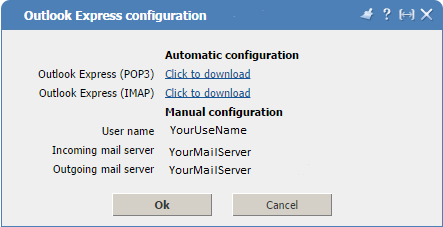
Information about mail servers also can be found here. You need to click "Outlook" in the upper right corner.

Here you can see all the necessary information which you need.
Now you need to download Microsoft Outlook and create an account there. While creating fill in all fields using the data obtained from ISPmanager.
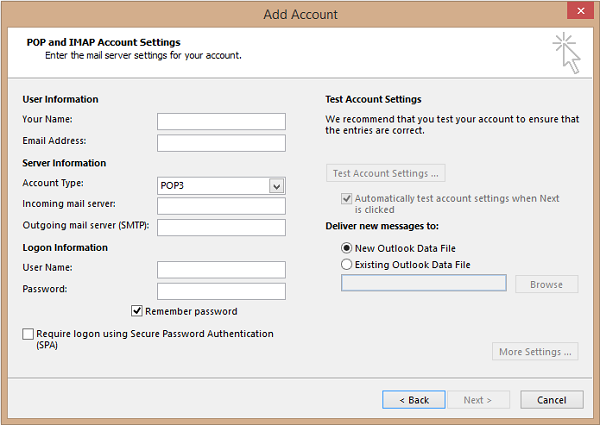
From this step creation of mailbox is completed.
Keep reading
How to re-install MySQL on a WHM/cPanel server
How to Change a cPanel Account Password from the Command Line
VestaCP: How to Add an External MySQL Server (Remote DB), Security, Firewall, and Troubleshooting
How to Add a Domain in VestaCP: WEB, DNS, SSL, and Post-Setup Checks (Step-by-Step)
How to Create a Mailbox in VestaCP: Account, DNS, Security, and Setup (Step-by-Step)
How to Create a Mailbox in cPanel: Account, Password, Quota, and Setup (Step-by-Step)