
Site-to-site VPN your offices never have to think about
CloudHosting SIA, a Latvian IT infrastructure provider since 2016, designs, deploys and monitors managed site-to-site VPNs over IPsec or WireGuard that join your offices, remote staff and servers in its Riga data centre into one private network, for companies with two or more sites. Every tunnel is monitored with alerting 24/7, and the price depends on the number of sites and endpoints.
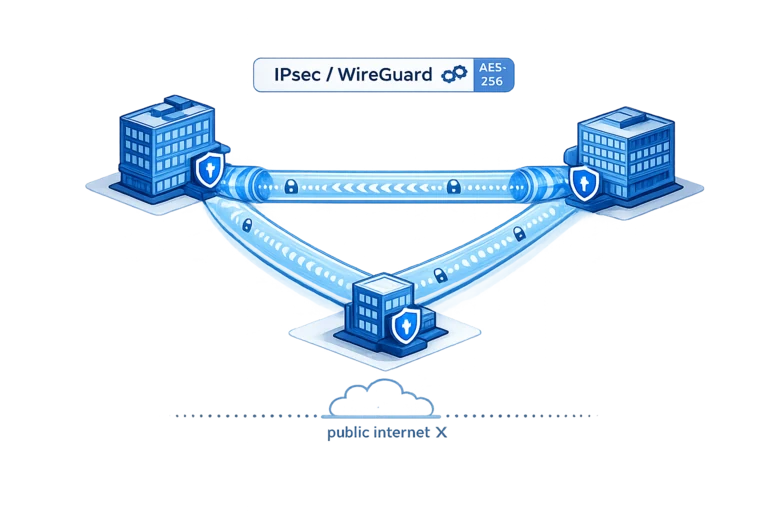
What a managed VPN gives you
One private network
Offices, remote staff and servers in our cloud reach each other over encrypted tunnels with sane addressing.
Modern crypto
WireGuard where speed matters, IPsec where the other side requires it. Configured properly either way.
Watched, not forgotten
Tunnels are monitored with alerting; a flapping link gets an engineer before users file tickets.
Works with your gear
MikroTik, Fortinet, pfSense or cloud endpoints: we integrate what you already run.
What the service includes
- Network design with addressing and routing plan
- IPsec or WireGuard tunnel configuration
- Connection of offices, cloud VPS and colocated gear
- Failover paths for critical links where needed
- Monitoring with alerting on tunnel health
- Change support when offices move or grow
Price depends on the number of sites and endpoints: request a quote for your topology.
How it works
- 1
Design
We map sites, subnets and equipment, and pick IPsec or WireGuard per link.
- 2
Deploy
Tunnels are configured, routed and tested with your team, site by site.
- 3
Operate
We watch tunnel health and adjust the setup when your topology changes.
VPN and networking guides
Step by step VPN, routing and MikroTik setups from our engineers.
Key facts about our managed site-to-site VPN
Short answers to the questions companies ask first. Each point is confirmed again in the written offer.
| Provider | CloudHosting SIA, a Latvian IT infrastructure provider operating since 2016 |
|---|---|
| What you get | Network design with an addressing and routing plan, IPsec or WireGuard tunnels, failover paths where needed, monitoring with alerting and change support when offices move or grow |
| Where | Tunnels land in your private network in our Tier 3+ data centre in Riga, Latvia (EU), or in Amsterdam, where our servers and IP addresses sit in a local data centre operator's building; offices can be anywhere with an internet line |
| Equipment | MikroTik, Fortinet, pfSense and cloud endpoints; routers you already own are reused when that is safe |
| Price | On request: set by the number of sites and endpoints; design, deployment and monitoring are part of the price, not extra line items; prices without VAT |
| Minimum term | Set in the written offer |
| Support | Monitoring and incident response 24/7. Engineers answer on working days 9:00-17:00 Riga time, in English, Latvian and Russian. |
| Contract | With CloudHosting SIA, an EU company registered in Latvia; invoices in EUR, nothing is charged automatically |
Checked:
Site-to-site VPN questions
What is a site-to-site VPN?
CloudHosting builds site-to-site VPNs that join whole networks, for example two offices or an office and our cloud, into one private network over an encrypted IPsec or WireGuard tunnel. The tunnel runs between the routers or firewalls at each location, so every device behind them reaches the other side securely without a VPN client on every laptop or phone. For day-to-day users nothing changes: file shares, internal tools and printers simply work as if everyone sat in one building. We plan the addressing so the networks do not clash and monitor the links around the clock, so problems are seen early.
IPsec or WireGuard: which one do I need?
CloudHosting picks the protocol per link in a managed setup, based on what each side supports, so in most cases you do not have to decide. WireGuard is faster and simpler, so we prefer it wherever both endpoints allow it, for example between a MikroTik router and our cloud. IPsec remains the right choice when the far end is a corporate firewall that only speaks IPsec, which is still common in larger companies and with partners you do not control. Both are configured with modern settings either way. If you already know a constraint on your side, mention it when requesting a quote and we plan around it.
How much does a managed site-to-site VPN cost?
CloudHosting prices a managed site-to-site VPN by the number of sites and endpoints you want connected, so there is no fixed list price: two offices and a cloud are a smaller job than many sites with failover paths. Network design with an addressing and routing plan, tunnel deployment and 24/7 monitoring are part of the service, not separate line items you discover later. To get a concrete number, send us a short list of your locations, the equipment at each one and which links are critical for you, and we return a quote for that exact setup, without VAT.
Can you connect our office to servers in your cloud?
CloudHosting gets this request more often than any other: an encrypted tunnel from your office router straight into your private network on our VPS or colocation in Riga, so your servers behave like another room in the office. Staff open internal applications, databases and file shares by their private addresses, and those services no longer need to be exposed to the public internet. We plan the addressing together so office and cloud subnets do not overlap, configure routing on both ends and test it with your team. After that, adding another server on the cloud side is just a routing entry, not a new project.
Do we need special hardware in the office?
CloudHosting works with the routers and firewalls most offices already have, such as MikroTik, Fortinet and pfSense, and with cloud endpoints where a site has no physical gear, so usually no new hardware is needed. During design we check what each location runs, its software version and spare capacity, and reuse it whenever that is safe. If the office has nothing suitable, for example only an ISP box that cannot be configured, we recommend an appropriate device and configure it for you. You stay the owner of your equipment; we manage the VPN part of its configuration.
What happens if a tunnel drops?
CloudHosting monitors every tunnel it runs with alerting 24/7, so a drop is noticed by us, not discovered by your users. The first step is diagnosis: a failed ISP line, a rebooted router and a changed configuration on the far side look different and need different fixes. The tunnel is then brought back or, where a backup path exists, traffic fails over to it. For critical sites we design that second path in advance, so a single line failure does not stop your work. A link that keeps flapping gets attention before it turns into an outage, which is the main practical difference from an unmanaged setup.
Can remote employees use the same VPN?
CloudHosting connects remote staff to the same private network as your offices and your servers in our cloud, under one addressing plan and one set of firewall rules. That replaces a separate remote-access product living next to the site tunnels. A person working from home reaches the same internal services as a colleague at a desk in the office, under the same access rules. Administration stays simpler too: when someone leaves, you revoke one access, and when a service moves from the office to the cloud, nobody has to reconfigure their client. Tell us roughly how many remote users you expect and we include them in the design.
Where are your servers located?
CloudHosting keeps your servers in the Tier 3+ data centre it runs itself in Riga, Latvia, on its own network AS58269, so a tunnel that lands there stays on infrastructure we operate end to end. The second region is Amsterdam, the Netherlands, where our servers and IP addresses sit in a building that belongs to a local data centre operator, and a Dubai site is available on request. A tunnel from your office terminates directly in your private network next to your VPS or colocated equipment, whichever region it lives in. If your sites are spread across countries, we account for that in the design, for example by connecting each office to the nearest region.
Site-to-site VPN or a private circuit: which do we need?
CloudHosting offers both: a site-to-site VPN runs encrypted over the internet lines you already have, while a Carrier Ethernet circuit is a private Layer 2 path in Riga that never touches the public internet. A VPN is the practical choice for most companies, because it needs no new cabling, connects offices in any country and costs less. A private circuit makes sense when VoIP, replication or trading traffic needs the same latency every day, with availability and repair terms in the contract. Many networks mix the two, a circuit between the main office and the data centre and VPN tunnels for branches, and we can design that with you.